Prediction models, explained clearly
A better forecast starts with better evidence.
A retailer has to order next week’s stock before knowing what customers will buy. Too much, and money sits on the shelf. Too little, and sales walk out the door.
Machine learning helps make that decision by learning from past examples to predict what may happen next. ML Referee helps with the next question: which proposed changes have evidence that they improve the prediction?
The retailer below is an illustration, not a customer result. Follow its decision from the first forecast to the next research investment.
01 / Start with the decision
Before choosing an order, estimate what will sell.
A prediction is an estimate of something you do not yet know. For the retailer, that is next week’s sales. A better estimate can help it carry enough stock without tying up money in products that will not move.
The forecast does not place the order. The retailer still weighs the cost of leftovers against the cost of empty shelves. Prediction supplies evidence for that decision.
The same idea appears elsewhere: a search engine predicts which links will be useful; a streaming service predicts which films you might enjoy. Businesses and governments use predictions to reduce waste, allocate resources, and identify risks. Here, we will stay with the retailer.
02 / Build a starting forecast
The clues are already in the spreadsheet.
Imagine a spreadsheet with one row for each product in each past week. One column records units sold—the answer. Other columns record clues available before that week began: the price, planned promotions, and the weather forecast.
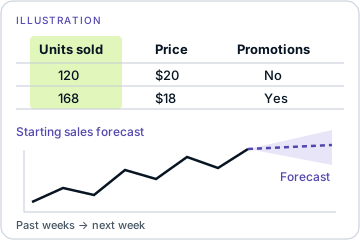
Those clue columns are called features. A machine-learning algorithm learns relationships between features and sales. The resulting model uses those relationships to estimate sales for a new week.
Once the retailer has a working model, it has a baseline: a starting point against which to judge improvements. Referee enters at the evaluation stage, when the team has that baseline and new ideas to test.
03 / Decide which improvements to believe
Feature selection: more clues do not always mean better predictions.
The team proposes adding local events, holiday patterns, and hundreds of other possible clues. People or AI agents can produce plenty of ideas. The difficult part is deciding which deserve engineering time.
A new clue produces a slightly better score on past examples. Is it useful—or lucky? Test enough clues and some will look helpful by chance. This is the multiple-testing problem. Building around those coincidences can lead to overfitting: a model that looks impressive on familiar data but disappoints on new examples.
One way to investigate is an ablation: remove a feature or component and measure what changes. But many separate runs take time, and clues can work together. A promotion may matter differently during a holiday. Removing one clue at a time tells only part of the story.
The retailer needs more than a higher score. It needs evidence about which proposed changes to trust.
04 / What using Referee looks like
From a spreadsheet to evidence for the next decision.
Referee evaluates up to 1,000 candidate features in one statistical run. Here is how the retailer—or one developer working with an AI agent—would use it.
1. Prepare the examples and the question.
Start with the spreadsheet: each row is a past product-week, one column contains actual sales, and other columns contain clues known before that week began. Identify the existing clues used as the baseline and the new ones you want to test. If you already have model predictions prepared on examples those models did not train on, Referee can assess those supplied predictions instead.
You need: historical outcomes, a starting benchmark, proposed improvements, and a developer or capable coding agent to prepare the required format. You can fill that role yourself; a separate ML team is not required. Enough suitable history is needed for validation—the input checks help determine whether your submission meets the requirements.
2. Connect and get the required format.
Your developer or agent uses a supported client to connect to https://api.mlreferee.com/mcp. MCP is the interface through which an AI agent calls the service’s tools. The connection and submission guide explains the workflow; the connected service supplies the current input schema—the required columns, data types, and settings. The spreadsheet is a way to understand the data, not an Excel-file upload: the developer prepares CSV or JSON in the requested format.
Sign in through the supported connection and request beta access. Approval is manual, and signup does not automatically grant credits. Check available credits before proceeding. See current beta conditions.
3. Check, quote, and submit.
With permission to send the data, the developer uploads it, runs the free input checks, and obtains a credit quote. You approve that evaluation or give your agent a bounded budget. It then submits the job and checks for completion. Referee evaluates the submitted evidence; it does not need access to your live business systems.
For this beta, use synthetic, non-personal, or genuinely anonymized data. Real business data can qualify, but regulated data and identifiable or pseudonymized person-level records cannot. Check data eligibility before uploading.
Referee does not send evaluation datasets to an LLM to run its analysis or reuse them to train shared AI models. Your team’s chosen AI client has its own data policies. Evaluation files have short expiration windows, rather than an instant-deletion promise; AI-assisted debugging of evaluation data requires separate permission. See how evaluation data is handled.
4. Read the report and choose the next move.
Referee returns measured contributions, strength of evidence, uncertainty, and limitations. You or your agent retrieve and save the report promptly: reports expire with their inputs, within short windows of up to 24 hours from upload. The report helps you select improvements to validate, investigate a decline, or decide where more data could help. Final training and deployment remain with you.
05 / Turn evidence into a research decision
Now there is a reason for the next investment.
Suppose the promotion-related clues earn support, while a local-event clue remains uncertain. These are illustrative outcomes, but they show why the distinction matters.
The team can take the supported clues into the next model and test it on fresh weeks. It can set aside ideas that added no evidence in this evaluation. And it can ask whether collecting more examples of local events would resolve an uncertainty worth pursuing.
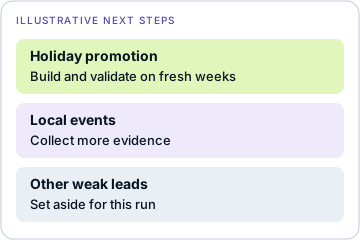
An unresolved feature is not automatically a useless feature. For an executive, that means the next budget request can name the question it is meant to answer—not merely ask for another round of experiments. More data may help, but the report gives the team a basis for deciding where that effort could be valuable.
And if the forecast later gets worse?
Suppose sales shift from stores to online orders. The model’s old relationships may no longer describe the business. For model repair, the team can supply evidence from stable and degraded periods, along with signals that might explain the change. Referee evaluates bounded repair proposals; the team then validates a proposed repair on fresh data.
That brings the work back to the same three questions: what belongs in the model, what changed when it stopped working, and where could more data help?
06 / From illustration to evidence
A real study shows the same distinction.
Our retailer is an illustration. A public AI-safety study shows the same decision in practice: which improvements deserve to move forward, and which need more investigation?
In our public AI-safety research study, Referee supported a model’s predictive improvement over its baseline. A separate test did not establish an added component’s incremental benefit. The overall improvement was worth pursuing; the component’s contribution remained a question for further research.